
How to use the Online Park Calendars at Walt Disney World
By Dave Shute
OVERVIEW: DISNEY WORLD PARK CALENDARS
I’ve noted elsewhere–for example, here, here, and here–that the best way to find out Disney World operating hours, Extra Magic Hours, fireworks and Fantasmic times, and such, is to work from the individual official Walt Disney World park calendars.
These calendars can be found by clicking the following links:
However, these calendars aren’t too user friendly, so I thought I’d give some advice on how to use them and about some of their odder aspects.
HOW TO USE WALT DISNEY WORLD’S THEME PARK CALENDARS
Once the calendar has loaded, here’s the key points:
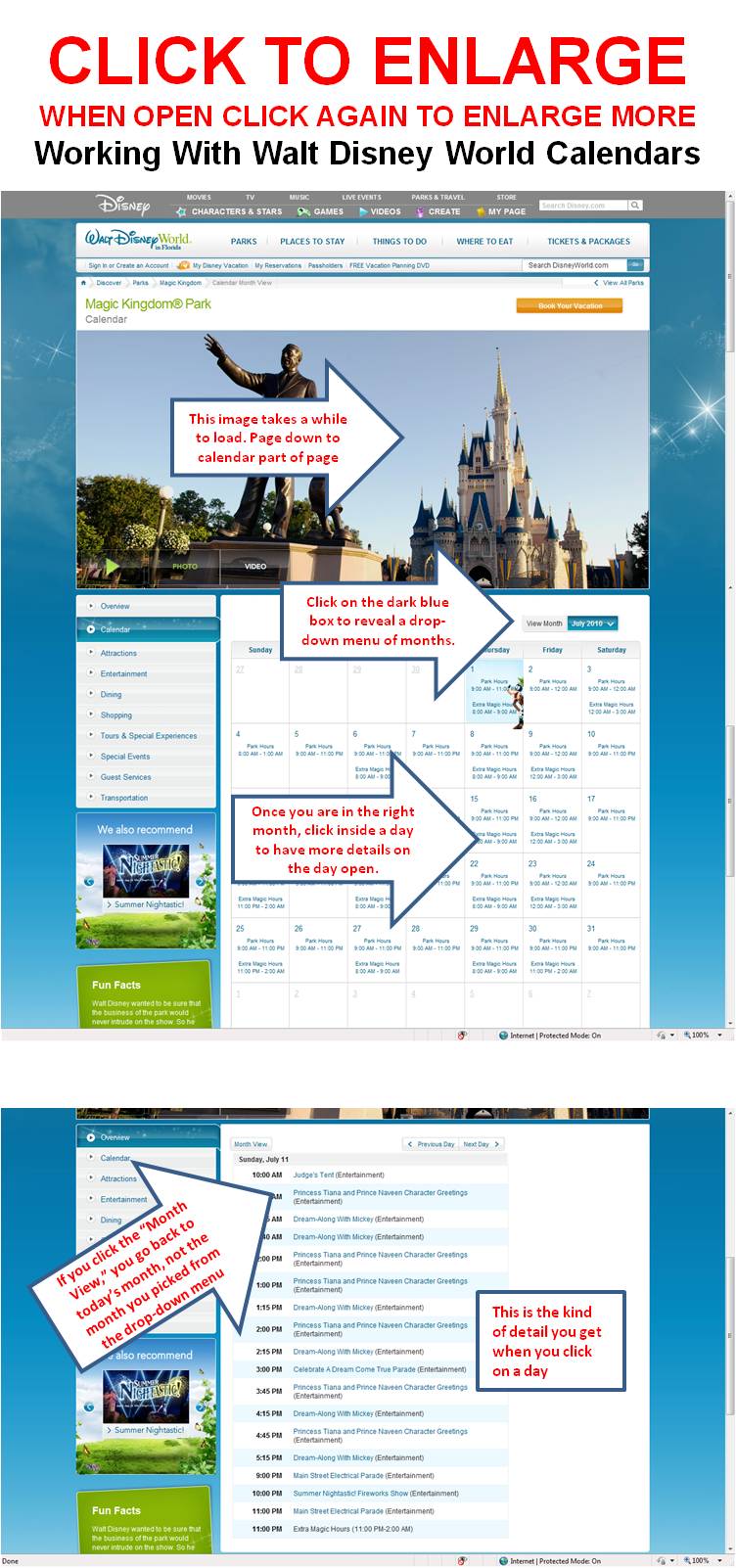 To find the month you are interested in, scroll down to the calendar itself, and find the blue box on the right side that has the month in it.
(Click the image for exactly where.)
Click the blue box, and from the drop down menu, select the month you want to learn more about.
- If a month is not offered, it’s because Disney World typically provides data for only the next 5-7 months.
- Disney updates the calendars towards the end of each month–try again later.
The month will open. If it is five or more months away, data may not be available yet.
For example, the days may be blank, or if you click on a day, you may not be able to find any details. Just come back later.
If the month is available, and the daily detail is filled in, then
- From the monthly page you can find operating hours and Extra Magic Hours, and
- By clicking on a date in the monthly page, you can find the details of offerings at the park that day–parade and fireworks times, etc.
Note that in a date view, a navigation menu at the top left gives you the option to see the next or previous days, or to return to the month view.
The next and previous day buttons work just as you would think. However, if you click the month view in this menu, you go back to the current month–not the month you picked from the drop-down menu. In a welcome change, clicking the month button returns you to the month of the day you had been looking at–not to the current month, as previously happened!
Disney typically does a general update of the park calendars about two weeks before the beginning of the affected month, and will at times change (that is, add) stuff even the day before. So if certain items are sensitive -for example, a second showing of Fantasmic or of the evening parade–keep checking! They may show up.


12 comments
We have an early morning breakfast scheduled at Cinderella’s Castle (either 8 or 830) before the park technically opens. How do we gain entrance to the park?
Hi Heather, each park has a turnstile or two that has a sign above it that will say something like “Character Breakfast.” You use that one to get in!
Will there be any Extra Magic Hours offered in the evenings of Feb. 18-22nd?
Hi Jane, yes there will–Hollywood Studios the 18th, and Epcot the 22nd.
Follow yourfirstvisit.net on Facebook!
I love checking your site daily for new questions and info. I am trying to mark my calendar for our trip – when to make reservations…and such.
We are arriving Nov 23rd (too late for the park, I think) and leaving the 29th (morning in the park, we think). Can you tell me the date I can get reservations? Should I do it by phone? or on the website? What is the earliest time to call or log-in? I am in California, so I will have to get up bright and early, I know. Being such a busy time at Thanksgiving, however, I want to get on it as soon as I can.
Also, when will you have your schedule out for which park which days for that time? Will it be before the reservations are made? I have been to Disneyland over 50 times, but WDW is a totally different kettle of fish (or maybe ball of string?) All the crowds expected at that time make me a bit nervous. My kids are experienced and just cannot wait to walk around (I think Epcot will be their favorite), but we will be traveling with family and for the youngest (5 and 7 at the time of the trip), it will be their first Disney trip…the more I have planned, the better it will go, I hope. I am worried that lines for eating will make it hard for them to enjoy the trip. I am thinking of reservations each day for lunch and dinner just to avoid lines. We are thinking 11 for lunch and 4:30 or 5 for dinner each day…again, hoping to help with the crowds.
We will do three character events – one in MK, one in Epcot and one in AK, I think. Might be too much? We skip that at Disneyland (did it once – had fun, but avoid the expense usually), but think it will be great for first-time young girls. My son (11) is a great sport and my daughter (8) will get into it with her cousins.
Any help would be grand,
Wendy
Hi Wendy! 180 days befroe is around May 27. You want to do it over the website. See this for an example of the steps (including things you need to do before the 180 day mark) and timing https://yourfirstvisit.net/planning-your-first-family-trip/to-do-list/to-do-lists-for-alternative-itineraries/to-do-list-v2-of-2009-autumn-winter-spring-itinerary/
I don’t publish which park which day–rather I do integrated itineraries. Those, for November, will be out in about two months–I need to wait until Disney releases its calendar. I’ll also comment on which day at which park on request, but only after the calendars are out!
Your three character meals seem fine, but two reserved meals a day will I think result in you being over-scheduled, and spending too much time dining…
Hope this helps, and keep the questions coming!
Follow yourfirstvisit.net on Facebook!
Hi Dave
We will be arriving at Disney on Sunday 29 Dec. around 2pm. 2 adults and 2 girls 8 and 10yr.
I know you have the summer/winter/etc schedules you recommend, but seeing that it is such a specific time ie. end of Christmas show and new year, etc, can you recommend what will be first prize for us for the 29/30/31? We are only leaving on the 8 Jan.
We’re not that keen on a character meal with Mickey etc., but would appreciate your advice.
Kind regards
Erna
Hi Erma, see this https://yourfirstvisit.net/2013/05/16/new-years-eve-20132014-at-walt-disney-world/ and this https://yourfirstvisit.net/2013/05/15/christmas-2013-at-walt-disney-world/ !
Hi Dave
Great site and fantastic resort reviews. We have been visiting WDW for some years but we still like your info on all the changes. You should do some reviews for frequent visitors – a bit like your personal favourites section.
Now to my question. My family are visiting the MK on Friday 3 July so I have been using the
Disney calendars. However none are giving a time for the fireworks/wishes on 7/3 or 7/4. Are they doing something different for the holiday weekend or nothing at all?
Have you any idea what’s happening?
Thanks Sue!!! See also this: https://yourfirstvisit.net/2014/12/14/the-fourth-of-july-2015-at-walt-disney-world/
Disney has special celebrations planned for the 3rd and 4th. Disney’s Celebrate America – A 4th of July Concert in the sky is scheduled both nights at 9pm at MK and HS will have a Special July 4th Fireworks at 10:15 on the 4th.
Thanks Kelly!!
Leave a Comment | Ask a Question | Note a Problem